User Guide
How to Register as a Broker
Follow the steps below to complete your broker registration and verification.
Create Your Application
Begin by navigating to the Register page. Fill in your complete personal and professional details including your full legal name, national ID number, email address, phone number, and your region of operation.
- Use your full legal name as it appears on your national ID.
- Double-check your email — verification emails will be sent here.
- Select the region where you primarily operate as a broker.
Upload Payment Receipt
The registration fee is 19,500 TSh. After paying, attach a valid receipt as proof (clear scan or photo in PDF, JPG, or PNG format).
- Accepted formats: PDF, JPG, PNG (max 5 MB).
- Ensure all four corners of the receipt are visible.
- Bank transfer receipts and official cashier receipts are both accepted.
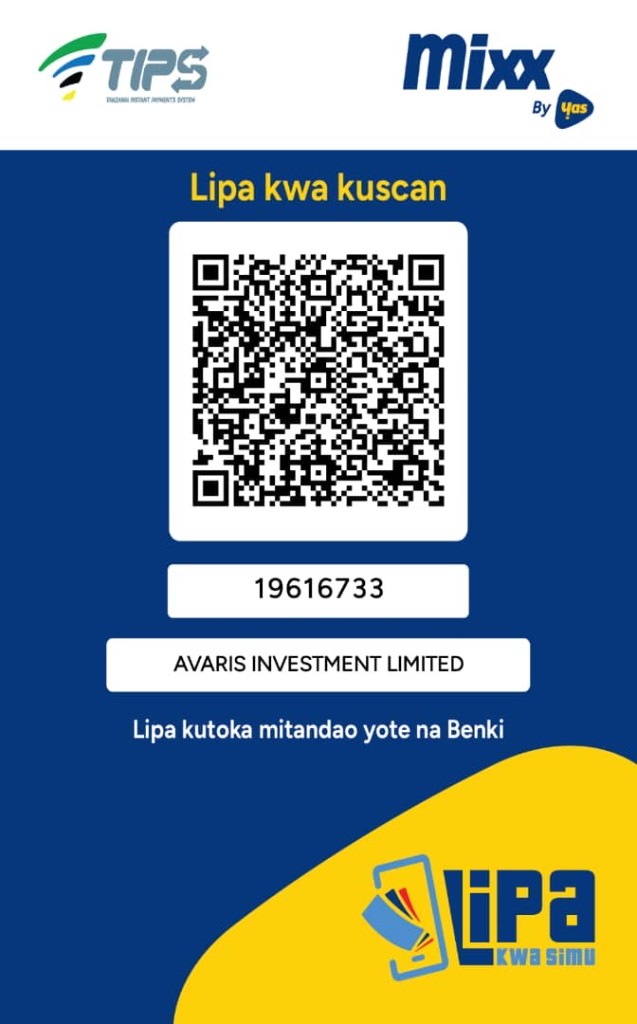
Registration fee: 19,500 TSh — pay via TIPS / Mixx by Yas
Scan the QR code to pay 19,500 TSh, or use Account Number 181106160 (BROKERS FUND). You can pay from any mobile network or bank.
Admin Review & Approval
Your application is reviewed by the Realtors Board within 3–5 working days. You will receive an email notification once your application is approved, rejected, or if additional information is required.
- Check your spam folder if you don't receive an email.
- Approval typically takes 3–5 working days.
- You will be notified by email with your Registration Number upon approval.
Verify Your Broker Status
Once approved, your information will be publicly searchable on the Verify page. The public, your clients, and other agencies can verify your status anytime using your name or registration number.
- Your status badge shows Verified, Pending, or Expired.
- Verification is renewed annually.
- Share your registration number with clients for instant verification.
FAQ
Frequently Asked Questions
Typically 3–5 working days. You will receive an email update at each stage.
You will receive an email explaining the reason. You may resubmit after addressing the issue.
Renewal is done annually. You will receive a renewal reminder email 30 days before your registration expires.
Yes. Please contact the Realtors Board office for the current fee schedule.
Yes. Contact the admin office with a written request and supporting documentation to update your profile.
Ready to get started?
Submit your application today and join the official Realtors Board registry.
Start Registration